What Is Script Lining? (The Vertical Lines Explained)
Script lining is how a script supervisor maps coverage onto the page. Here's what the lines, squiggles, and shot labels actually mean.
What Is Script Lining? (The Vertical Lines Explained)
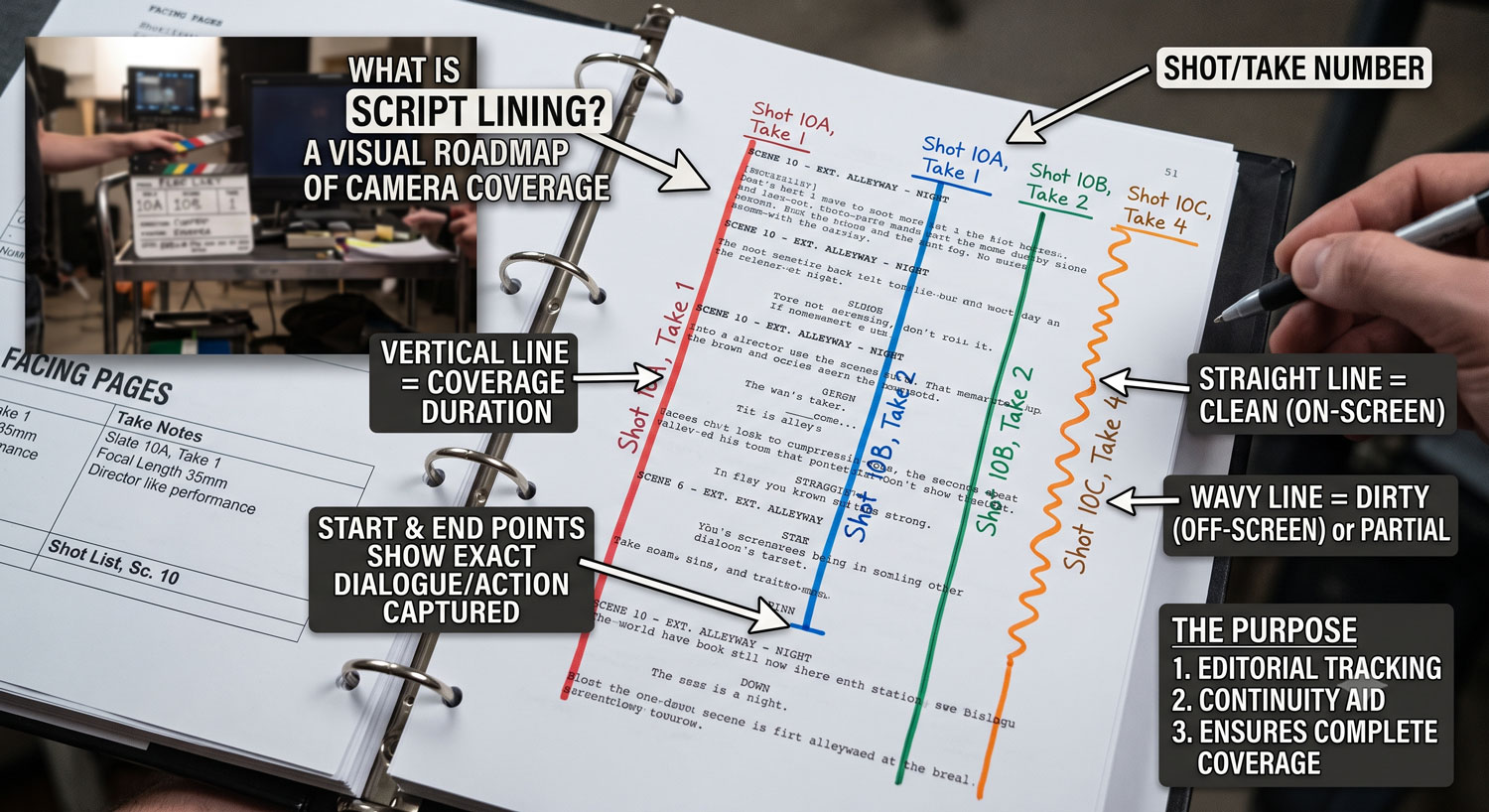
Script lining is the practice of marking up a script during shooting with vertical lines down the page, one per shot, showing exactly which lines of dialogue and action that shot covers. A solid vertical line means the camera and the actor's performance were both live for that stretch of text; a squiggle or dashed line means the action or line happened off-camera or off-mic. The result — a lined script — is a visual map that tells anyone who wasn't on set exactly what coverage exists for every beat of a scene.
It's the single most useful artifact a script supervisor produces, because it answers the editor's most basic question — "what do I actually have to cut with" — without anyone needing to watch every take first.
The 50-word definition
Script lining is marking a script with a vertical line per shot to show which text that shot covers, using solid lines for on-camera/on-mic action and squiggles or dashes for off-camera action. The lined script maps coverage scene by scene so an editor can see, at a glance, which shots exist for which part of the action.
Why it exists
A scene with six setups covering the same three pages of dialogue produces dozens of takes. Nobody remembers, three months later in the edit bay, which of those takes has a clean two-shot for a particular exchange and which only has the wide. The lined script is the index. Instead of scrubbing through footage, the editor opens the lined page, sees which shot numbers cross which lines of dialogue, and pulls exactly the take they need.
This is the natural companion to the script breakdown work done in pre-production — breakdown identifies what a scene needs before it's shot; lining records what was actually captured once it was.
How the marks work
A lined script uses a small, consistent set of marks:
- A solid vertical line running down the margin next to the dialogue/action a shot covers, labeled with the shot or setup number at the top and a bracket at the bottom of its range.
- A squiggle or wavy line in place of a solid line where the action described happens off-camera (a character heard but not seen) or off-mic (visible but not recorded cleanly).
- A short horizontal tick where a line crosses into a new shot's coverage, marking the exact word or beat where the cut point could land.
- Shot labels at the top of each line — typically a wide shot number, then subsequent shots numbered in the order they were filmed, not necessarily the order they play in the scene.
Multiple shots' lines run in parallel down the same page, so a busy scene with heavy coverage ends up looking like a ladder of vertical lines, each one representing a different angle's claim on that stretch of the script.
An example
Take a short exchange:
                              12   14   15

JAMES               |    |    |
    You said you'd be here    |    |
    by six.               |    |    |
                              |    |    |
MARIA                    |    |    |
    (O.S.)                    ~~~~ |
    Traffic.             ~~~~ |    |
                              |    |    |
JAMES                    |    |    |
    That's what you said last  |    |
    time.                 |    |    |
Here, shot 12 (likely the wide, or master) runs solid through the whole exchange. Shot 14 covers James's coverage with a solid line, but Maria's "Traffic." line is squiggled because in that setup she's off-camera. Shot 15 might be Maria's own close-up, where her line goes solid and James's goes squiggled instead. An editor reading this instantly knows: for a clean on-camera "Traffic," cut to shot 15; shot 14 only gives James's face during that beat.
Where lining fits with a shot list
Lining records coverage after the fact; a shot list plans coverage before the fact. The two aren't the same document, but a shot list that spells out coverage type clearly (what is coverage in film covers the terminology — wides, mediums, close-ups, inserts, OTS) makes lining faster on the day, because the script supervisor already knows roughly what each planned setup is meant to capture and just confirms it landed as shot.
Lining is also what feeds the continuity notes and coverage summary in the daily report that goes out to production and editorial at the end of the day.
Digital vs. paper lining
Traditionally lining is done by hand on a printed script with colored pens — a different color per shot number keeps overlapping lines readable, in the same spirit as the color conventions used on a stripboard, though the two color systems track completely different things (schedule vs. coverage). Digital lining tools replicate the same visual language on a PDF or in-app script view, letting the script supervisor tap or drag over the covered text and select a shot number instead of hand-drawing lines — faster, and it survives past the shoot without a physical page getting lost or coffee-stained.
What a lined script is not
It's not a substitute for camera logs or take selections — a lined script tells you which shot covers a beat, not which take of that shot is the good one. Take-level selects are a separate layer, covered in circle takes explained. And it's not a creative document — it's a factual record of what was captured, not an opinion about which shot should be used in the cut. That decision still belongs to the director and editor.
Try it inside your script breakdown
Lining works best when it's attached to the same scene data your breakdown and shot list already use, so a shot marked "complete" on set automatically shows up as covered in the lined view. Production Slate's script module includes an in-app lining mode on top of the script reader — select text, pick the shot that covers it, and the coverage rolls straight into your script supervision log without a separate paper pass.
Written by Production Slate · Production Slate