Free Call Sheet Template (Copy-Paste Layout)
A copy-paste call sheet layout that drops straight into Google Docs, Word, or Excel. No email signup, no watermark, no gated download.
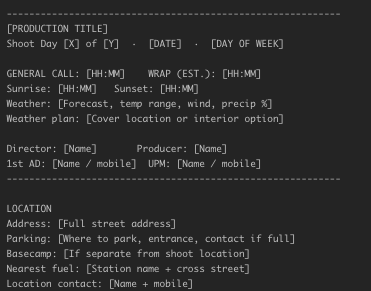
Free Call Sheet Template (Copy-Paste Layout in Under 5 Minutes)
Most "free call sheet template" posts link to a PDF from 2014 with someone else's production logo baked in, or a Google Doc that needs a sign-up. This post does neither. The template is the layout below, written as plain text you can copy into Google Docs, Word, Excel, or Notion in under five minutes. No email gate. No watermark. No backlink bait.
It's the same twelve-block structure working 1st ADs use on real productions. If you need more context on what each block does, the full step-by-step guide and complete checklist pair directly with this template.
How to use it
Pick your destination:
- Google Docs — open a new blank doc, paste the block below, switch to two-column layout for the Crew/Cast section. Roughly 4 minutes.
- Word — same as Docs. Use a table for the crew call times block.
- Excel / Google Sheets — one worksheet per section, or one worksheet with merged-cell headers. Better for productions with heavy logistics.
- Notion — paste as-is, convert headings, use toggles for the FAQ-style fields.
Fill in the bracketed placeholders, export to PDF, and send. Don't send the editable version — a PDF prevents recipients from accidentally editing the sheet.
The layout
Copy everything between the dashed lines below into your document:
-----------------------------------------------------------
[PRODUCTION TITLE]
Shoot Day [X] of [Y]  ·  [DATE]  ·  [DAY OF WEEK]

GENERAL CALL: [HH:MM]    WRAP (EST.): [HH:MM]
Sunrise: [HH:MM]   Sunset: [HH:MM]
Weather: [Forecast, temp range, wind, precip %]
Weather plan: [Cover location or interior option]

Director: [Name]       Producer: [Name]
1st AD: [Name / mobile]  UPM: [Name / mobile]
-----------------------------------------------------------

LOCATION
Address: [Full street address]
Parking: [Where to park, entrance, contact if full]
Basecamp: [If separate from shoot location]
Nearest fuel: [Station name + cross street]
Location contact: [Name + mobile]

HOSPITAL & SAFETY
Nearest hospital: [Name / Address / Phone]
Drive time to hospital: [~X minutes]
On-set medic: [Name / mobile]
Safety notes: [Stunts, firearms, working at height, etc.]
Risk assessment: [Document name + date, if applicable]

WALKIE CHANNELS
1: Production   2: Camera   3: G&E   4: Sound
5: Art          6: Wardrobe 7: Hair/MU  8: Transport

-----------------------------------------------------------
SCHEDULE (today)
-----------------------------------------------------------
Sc#   D/N  I/E   Pages   Location       Cast     Description
[14]  D    I     1 2/8   [Cafe]          1, 2    [One-liner]
[22]  D    I     5/8     [Cafe]          1       [One-liner]
[78]  N    I     1 4/8   [Cafe]          1, 3    [One-liner]

-----------------------------------------------------------
CREW CALL TIMES
-----------------------------------------------------------
Dept          Position          Name              Call    Mobile
Camera        DP                [Name]            07:00   [mobile]
Camera        1st AC            [Name]            07:00   [mobile]
G&E           Gaffer            [Name]            07:00   [mobile]
G&E           Key Grip          [Name]            07:00   [mobile]
Sound         Mixer             [Name]            07:00   [mobile]
Art           Designer          [Name]            06:30   [mobile]
Wardrobe      Supervisor        [Name]            06:00   [mobile]
Hair          Key               [Name]            05:30   [mobile]
Makeup        Key               [Name]            05:30   [mobile]
Production    Coordinator       [Name]            06:00   [mobile]
Catering      On site           [Name]            06:00   [mobile]

-----------------------------------------------------------
CAST CALL TIMES
-----------------------------------------------------------
ID   Character     Actor           Pickup   H/MU    Wardrobe  On-set
1    [Lead]        [Name]          06:00   06:30   07:00     07:30
2    [Best friend] [Name]          06:30   07:00   07:30     08:00
3    [Antagonist]  [Name]          —        07:30   08:00     08:30

-----------------------------------------------------------
ADVANCE SCHEDULE (tomorrow)
-----------------------------------------------------------
Call: [HH:MM]   Location: [Name]
Scenes: [Shorthand, e.g. "Sc 31, 33, 35 — EXT. STREET — Day"]
Notes: [Company move, night shoot, early call, etc.]

-----------------------------------------------------------
DAY'S NOTES
[Neighbor sensitivities, closed-set rules, visitor protocols,
 crane moves, load-in timing, anything that doesn't fit above.]

Emergency contacts
 - On-call producer: [Name / mobile]
 - Production insurance: [Carrier / policy # / 24h line]

Version: v1 · Distributed [DATE, TIME]
-----------------------------------------------------------
That's the full template. Paste, fill, export to PDF, send.
Section-by-section notes
A few things that aren't obvious from the layout alone:
The top block is the most-read part. Crew glance at the call sheet in bed. The general call time has to be findable in one second. Make it the biggest text on the page.
Crew call times cascade from the general call. Hair/makeup calls earlier (90 minutes on light-makeup days, 3–4 hours on prosthetics). Wardrobe typically 30–60 minutes before general. Most other departments call at general or 15 minutes before for pre-light. Catering is set up by 6 AM regardless.
Cast times build backwards from on-set. Start with the scene's required on-set time, subtract wardrobe time, hair/makeup time, and pickup/travel. SAG and most guilds treat the earliest call (usually pickup) as the start of the work day.
Page counts use eighths, not decimals. "1 4/8" means one and a half script pages. The script's page count is measured in 1/8-page increments. Your script breakdown should already have this.
Walkie channels stay on the sheet even if they "don't change". First radio check at 7 AM is not the moment to remember what channel camera is on.
Version number goes inside the document, not just the filename. A PDF called "Call Sheet Day 7 FINAL.pdf" can get replaced by "Day 7 REVISED.pdf" and nobody knows which is current. Stamp the version on the page itself.
For the full mistake catalog the template structure is designed to prevent, see our 8 common call sheet mistakes post.
When the template stops working
This layout covers every block a professional call sheet needs, and it works fine on shoots up to about 10–15 days. Past that, three problems start surfacing:
- Call times drift from the schedule. The template lives in one document, the shooting schedule lives in another. Every update has to be re-entered in both places, and sooner or later they disagree.
- No delivery tracking. Emailing a PDF attachment gives you no signal on who has actually opened it. At 10 PM the night before a 5 AM call, that signal matters.
- Revisions are painful. A location changes at 6 PM, you re-save the doc, re-export to PDF, re-attach to an email, and hope everyone re-downloads it. Some crew members won't.
At that point, the template has become the problem, not the solution. Software that auto-builds the call sheet from your schedule — and tracks delivery per recipient — closes all three loops.
Production Slate as the software version
We built Production Slate's call sheet feature specifically for productions graduating out of spreadsheet templates. The sheet auto-populates from your schedule — crew, cast, location, weather, sunrise/sunset, hospital, walkie channel — and sends by email with per-recipient acknowledge links. The delivery board shows which crew have opened the sheet and which need chasing.
It's the same twelve-block structure as the template above, generated from your data instead of typed in.
FAQ
Can I use this template on a paid production? Yes. It's a layout, not a licensed document. Use it on paid shoots, branded content, commercials, music videos, features. No attribution required.
Is there a music video or commercial version? The feature-film layout above compresses cleanly for commercials and music videos — remove the per-scene page-count column and shrink the advance schedule block. Short shoots rarely need more than half the sections.
Do I need a separate talent sheet? On union productions, yes — cast get their own sheet with only their own info. On indie shoots it's optional but considered polite. The Cast Call Times block above adapts cleanly into a standalone talent sheet.
Should I send as PDF or as the editable Doc/Excel? Always PDF. An editable document lets recipients accidentally modify the sheet, which breaks version control. Export to PDF for distribution, keep the editable version as your source.
When should I send the call sheet? Night before, between 7 and 9 PM. Full timing protocol in our when to send the call sheet post.
Next step
Copy the template above into your document of choice and fill it in for your next shoot. When the template starts drifting from your schedule, Production Slate's call sheet feature auto-populates the same layout from your production data and tracks delivery per recipient. Free while your production is active.
Written by Production Slate · Production Slate